How To Unclog The Auto-Empty Base Of A Smart Vacuum?
Your smart vacuum promises hands-free cleaning. But then the auto-empty base stops working. Suddenly, you are back to manual chores.
A clogged base is a common problem. Debris gets stuck in tubes, flaps, or connection points. This blocks the path between your vacuum and the dust bag.
The good news? You can fix this yourself. No need to call for repairs or buy a new unit.
This guide walks you through the entire unclogging process. We cover simple checks like inspecting the dustbin and cleaning connection points. We also explain how to test the sensor and clear the vacuum passageway.
In a Nutshell
- Unplug the station first. This keeps you safe and stops the motor while you work.
- Check every connection point. Clogs love to hide in tubes, flaps, and the spot where the vacuum meets the dock.
- Clean the dustbin sensor. A dirty sensor can’t tell the base when to empty, so wipe it with a dry cloth often.
- Inspect and wash filters regularly. Dirty filters block airflow and make clogs worse over time.
- Try the manual reset trick. Press and hold the HOME button for two to five seconds to force the motor to run.
- Set smaller, frequent cleaning cycles. This simple habit stops debris from piling up and causing future jams.
How the Auto-Empty Base Works
Your smart vacuum’s auto-empty base works like a simple transfer system. When your vacuum finishes cleaning, it returns to the dock station. The dustbin inside your vacuum sits on top of the dock. The dock has a powerful suction motor that pulls debris from your vacuum’s dustbin into a larger collection bag or chamber below.
Here’s how the transfer happens. The dock creates strong suction through a tube connection. This suction pulls dirt, dust, and debris from your vacuum’s bin into the station’s storage area. The process usually takes 30 to 60 seconds. Once complete, your vacuum’s dustbin is empty and ready for the next cleaning cycle.
Several parts work together to make this system function. The connection point between your vacuum and dock is critical. A rubber seal or flap creates an airtight connection. The suction tube carries debris downward. A filter inside the dock catches particles while air escapes. The motor provides the pulling force needed to move everything through.
Clogs happen when debris gets stuck at key points. The connection points between vacuum and dock are common trouble spots. The tube itself can become blocked with pet hair or large particles. The flap that opens and closes can get stuck with dirt. The filter can become so clogged that suction weakens.
Understanding this system helps you prevent problems. Regular maintenance keeps everything flowing smoothly. You need to check connection points for dirt buildup. The dustbin edges should stay clean. Filters need frequent cleaning to maintain strong suction power.
When your base stops working properly, you know exactly where to look. The transfer system depends on clean pathways and strong suction. Any blockage in these areas stops the auto-empty process completely.
Signs Your Auto-Empty Base Is Clogged
Your auto-empty base will show you clear signs when a clog develops. Learning to spot these warnings helps you fix problems before they get worse.
The most obvious sign is incomplete emptying. Your vacuum returns to the dock but debris stays in the dustbin. You might see the dustbin still half full after the auto-empty cycle completes. This means suction isn’t strong enough to pull dirt into the base station.
Listen for unusual sounds during emptying. A healthy auto-empty base makes a consistent whooshing noise. Clogs create loud rattling, grinding, or stuttering sounds. These noises mean debris is stuck in the tube or flap connections.
Pay attention to error messages on your app or display. Many smart vacuums alert you when the dock can’t empty properly. You might see “empty dock” or “connection error” warnings. These messages tell you something blocks the transfer pathway.
Check for weak suction after emptying attempts. If your vacuum seems less powerful than usual, the dustbin sensor might be dirty. A blocked sensor prevents the vacuum from knowing when it’s full. This stops the auto-empty cycle from starting.
Look for visible debris around connection points. Dirt buildup around where the dustbin meets the dock indicates clogs forming. Pet hair often wraps around these areas and blocks airflow.
Notice if the bag fills slower than normal. Your base station bag should fill gradually over time. If it stays nearly empty while your vacuum keeps running, suction problems exist somewhere in the system.
Dust leaking from the dock is another red flag. Small amounts of dust escape when seals are loose or tubes are clogged. You’ll notice fine particles around the base station area.
These signs appear individually or together. Early detection means faster fixes and better performance from your smart vacuum.
Step-by-Step Guide to Unclogging the Base
Start by unplugging your smart vacuum’s auto-empty station from the wall outlet. This step keeps you safe while you work on the internal parts.
Next, remove the dustbin from the top of your vacuum. Look inside carefully for any visible debris, pet hair, or dirt clumps that block the pathway.
Check the connection points where the vacuum sits on the dock. These spots transfer debris from your vacuum to the base station. Wipe away any dirt buildup with a dry cloth around these edges.
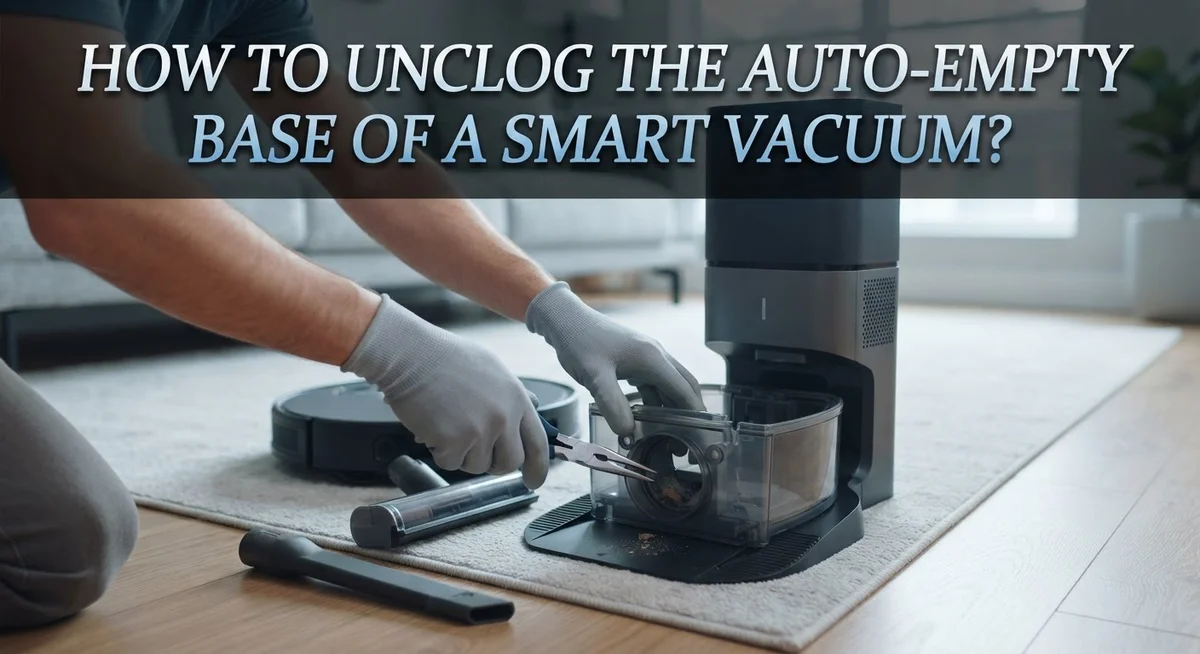
Locate the tube or passageway inside the dock that pulls debris down into the bag. Shine a flashlight through this area to spot blockages. If you see a clog, gently use a straightened wire or thin stick to break it apart. Remove any loose pieces by hand.
Clean the dustbin sensor with a dry cloth. This sensor tells your vacuum when to start the auto-empty cycle. A dirty sensor prevents proper emptying signals.
Inspect all rubber flaps and valves in the dock. These parts open and close to control airflow during emptying. Wipe them clean and check that they move freely without sticking.
Empty the collection bag or container in your dock station. A full bag reduces suction power and causes backup clogs.
Run your fingers along all visible hoses inside the dock. Feel for hard spots or blockages. Gently massage these areas to loosen stuck debris.
Once everything looks clear, reassemble your dustbin and plug the station back in. Press the home button on your vacuum to dock it. Watch the first emptying cycle to confirm it works properly.
If suction seems weak, the filters likely need cleaning. Tap filters gently over a trash can to remove dust. Wash them with water if your manual allows this.
These practical steps fix most clogs and restore your auto-empty base to normal function.
Cleaning Filters and Sensors for Better Airflow
Filters and sensors work together to keep your auto-empty base running smoothly. When these parts get dirty, airflow suffers and clogs become more likely.
Start with your dustbin sensor. This small part tells your vacuum when the bin is full. Dust and debris collect on the sensor over time. Use a dry cloth to wipe it gently. Do this every week if you have pets. A clean sensor prevents false signals that confuse your system.
Next, check your vacuum’s filters. Dirty filters block air from moving through the dock properly. This creates pressure problems that lead to clogs. Remove your filters and tap them gently over a trash can. Tap from the clean side toward the dirty side. This loosens trapped dust without pushing it deeper into the material.
Wash your filters with cool water if they’re washable. Let them dry completely before putting them back. Dry filters work better and last longer. Replace filters every few months depending on your usage.
Look at the airflow path inside your dock. Run your hand along the tube where debris travels down into the bag. Feel for hard blockages or sticky buildup. Pet hair wraps around corners and creates stubborn clogs here. Pull out any visible hair with your fingers or tweezers.
Check rubber flaps and valves in the dock opening. These parts control where debris goes. Dust cakes onto them and reduces their movement. Wipe them with a damp cloth and let them dry.
Clean filters and sensors every two weeks for best results. This simple habit prevents most clogs before they start. Your vacuum will empty faster and more completely. The motor won’t work as hard, which extends your system’s life.
Tips to Prevent Future Clogs
Prevention is always easier than fixing clogs. Small habits now save you time and frustration later.
Schedule smaller, frequent emptying cycles instead of waiting for your dustbin to fill completely. When you let debris pile up, it creates pressure that forces hair and dust into tight spaces. Frequent cycles keep the airflow path clear and reduce blockage risk.
Adjust your auto-empty settings to match your home’s needs. If you have pets, run emptying cycles more often. Pet hair wraps around connection points and clogs tubes faster than regular dust. Monitor your vacuum’s behavior after each cycle to catch problems early.
Keep your dustbin edges clean and dirt-free before placing it on the dock. Debris on the rim prevents a tight seal. This gap lets air escape instead of pulling debris down into the bag. Wipe the dustbin edges with a dry cloth every few days.
Check your filters every two weeks. Clogged filters reduce suction power, which means debris doesn’t travel smoothly into the dock. This backup causes clogs at connection points. Wash washable filters with cool water and let them dry completely before reinstalling.
Clean your dustbin sensor regularly with a dry cloth. A dirty sensor sends false signals to your vacuum, preventing proper emptying cycles. This leads to incomplete transfers and stuck debris.
Inspect rubber flaps and valves monthly. These parts wear out over time and allow debris to escape instead of flowing downward. Replace them if you notice cracks or permanent bending.
Finally, check your vacuum’s passageway inside the dock quarterly. Run your fingers along the tube where debris travels. Remove any hair or dust you find. This simple step prevents buildup before it becomes a major clog.
Common Mistakes to Avoid During Cleaning
Mistakes during cleaning can make your clogging problem worse instead of better. The most common error is using wet cloths on sensors. Your dustbin sensor needs a dry cloth only. Water damages the electronic parts and prevents proper signals from reaching your vacuum.
Another frequent mistake is forcing stuck debris through tubes. Never push hard on blockages. This pushes dirt deeper into the passageway and can damage internal flaps. Instead, gently remove visible debris by hand first.
Many people neglect the connection points where the dustbin meets the dock. Dirt buildup on these edges stops proper sealing. Always wipe the dustbin rim and dock contact areas before reassembling. Even small particles prevent the vacuum from emptying correctly.
Skipping filter checks is a major oversight. Dirty filters reduce suction power in your dock station. This means debris cannot travel down into the bag efficiently. Check your filters every two weeks without fail.
Some users ignore the rubber flaps inside the dock. These valves control airflow and debris movement. Stuck flaps are silent killers of auto-empty performance. Inspect them monthly and remove any hair or dirt wrapped around them.
Rushing through reassembly causes problems too. After cleaning, take time to ensure everything sits properly. The dustbin must align correctly on the dock. Misalignment creates gaps where air escapes instead of pulling debris down.
Finally, avoid waiting too long between maintenance sessions. Many people only clean when clogs happen. Regular maintenance prevents most problems from starting. Set a schedule and stick to it. Small, consistent efforts keep your auto-empty base working smoothly for years.
Troubleshooting Persistent Emptying Problems
When your smart vacuum stops emptying into its dock, persistent problems usually point to a few specific areas. Start by checking the suction motor itself. The dock station has a motor that pulls debris from your vacuum’s dustbin. If this motor isn’t working, nothing will transfer.
Press and hold the HOME button on your dock for 2 to 5 seconds. This manually activates the motor so you can hear if it’s running. Listen for a strong sucking sound. If you hear nothing or just a weak noise, the motor may need service.
Next, inspect the hose connection between your vacuum and dock. Debris can hide at the junction point. Remove your vacuum from the dock and look inside where it connects. Use a flashlight to spot any blockages. Push your finger through gently to clear any stuck material.
Check the dock’s suction pathway carefully. Sometimes dirt packs down inside the tube leading to the collection bag. Run your fingers along the entire length from top to bottom. Feel for hard spots or clogs.
Verify your collection bag isn’t full. Even with an auto-empty base, the bag itself fills up over time. A full bag stops suction immediately. Replace or empty it according to your model’s guidelines.
Test the rubber flaps again after cleaning everything. These should move freely without resistance. Push them gently with your finger. They should snap back quickly.
If the motor runs but nothing moves, check for damage inside the hose. Cracks or holes reduce suction power. Look for any visible damage or wear.
Finally, try a complete power cycle. Unplug your dock for 30 seconds, then plug it back in. Sometimes the system needs a reset to work properly again. This simple step fixes many stubborn emptying issues.
Final Thoughts
Keeping your smart vacuum’s auto empty base clog free does not need to be complicated. Regular checks on connection points, filters, and sensors save you from bigger headaches later.
Most clogging problems come from small buildups that grow over time. Pet hair, dust, and debris can settle in tubes and flaps if you skip cleaning sessions.
The good news is that maintenance takes only a few minutes each week. A quick wipe of the sensor and a look inside the dock can prevent most issues.
Consistency matters more than intensity. You do not need to deep clean every day. Instead, build a simple routine that fits your schedule and your vacuum’s usage.
If your vacuum still struggles to empty after cleaning, do not panic. Go back through each step slowly. Check the hose, the flaps, and the suction pathway again.
Sometimes a power cycle or a manual motor activation solves problems that cleaning alone cannot fix. This gives the system a fresh start.
Remember that every vacuum model works a little differently. Your dock’s airflow path or flap design may look slightly different from other models.
Always refer to your specific vacuum’s manual for exact steps. This guide gives you the general approach that works across most auto empty systems.
With patience and a steady routine, your vacuum will keep running smoothly. You will spend less time troubleshooting and more time enjoying a clean home.
Clogs are frustrating, but they are rarely permanent. A little care goes a long way toward keeping your smart vacuum’s base working the way it should.
In the end, simple habits prevent most emptying problems. Clean often, check connections, and act quickly when something feels off. Your vacuum will thank you with reliable performance every single day.
Frequently Asked Questions
What causes clogs in the auto empty base?
Clogs happen at connection points between your vacuum and dock. Pet hair builds up quickly in tubes and rubber flaps. Debris gets stuck where the dustbin meets the station. Dust accumulates inside the suction pathway over time. Neglecting regular cleaning allows small blockages to grow into bigger problems.
How do I know if my auto empty base is clogged?
Your vacuum won’t empty into the dock when you expect it to. You hear the motor running but nothing transfers. The dustbin stays full even after docking. Your dock makes unusual sounds during the empty cycle. The sensor light shows an error or warning signal.
Can I clean the dustbin sensor myself?
Yes, you can clean it easily. First, unplug your auto empty station from the wall. Remove the dustbin from the vacuum. Use a dry cloth to wipe the sensor gently. Make sure no dirt covers the sensor lens. A clean sensor helps your vacuum know when to trigger the empty cycle. This simple step prevents many false clogs.
Why does my vacuum still won’t empty after cleaning?
Several things could be the issue. Check that the collection bag inside your dock isn’t full. Inspect the hose for cracks or damage. Make sure all connection points fit snugly together. Try pressing and holding the HOME button for 2 to 5 seconds to manually activate the motor. If nothing moves, the suction motor might need service.

Hi, I’m Grace Bell, the founder of CleanFloorVault.com, where I personally test and review vacuum cleaners to help you find the perfect tool for a spotless home.