How To Fix A Stuck Dirt Sensor Light On An Upright Vacuum?
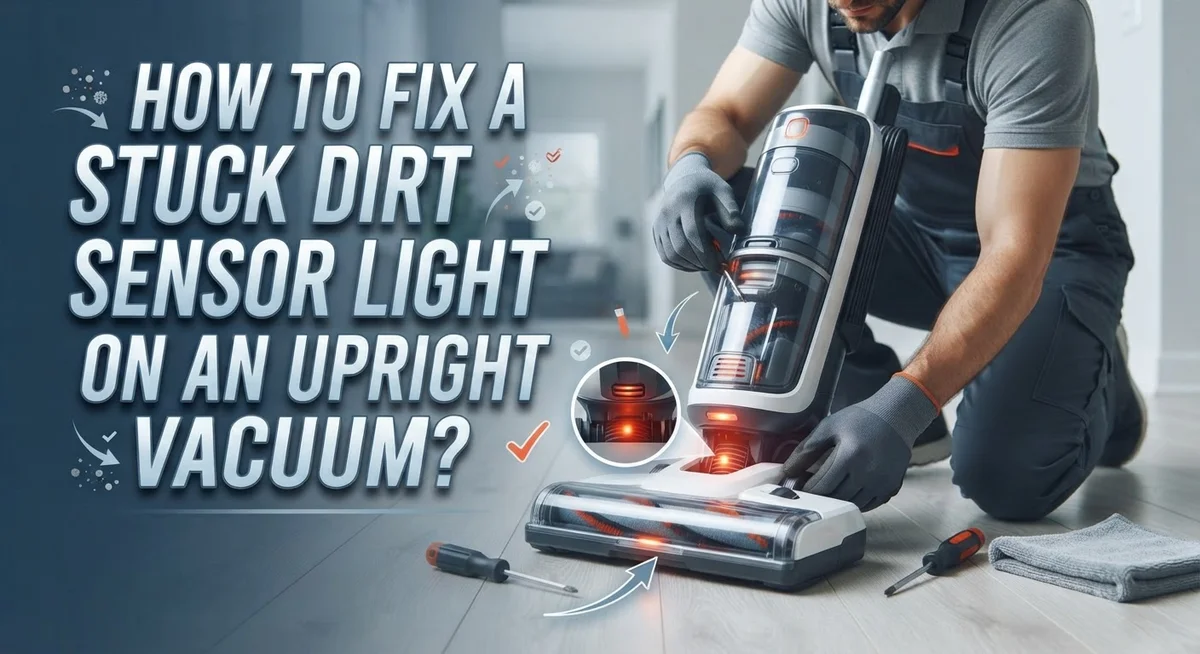
Does your vacuum’s dirt sensor light stay on even after you empty the bag? This little light can be really annoying. It blinks or glows no matter what you do.
The good news is that this problem is common. Most upright vacuums use small optic cells to detect dust. Sometimes these cells get dirty or confused, and they get stuck.
The light does not always mean your bag is full. It often means the sensor itself needs attention. Dust and debris can build up on these tiny cells over time.
In a Nutshell
- Find the sensor first. It sits near the dirt bag inlet. Look for small optic cells inside this area.
- Wipe with a dry cloth only. Never use water or wet wipes on the sensor. Moisture can damage the optic cells permanently.
- Check your filters next. Dirty or loose filters often trigger false alerts. Clean them well and seat them properly back in place.
- Skip harsh chemicals completely. Sprays and cleaners can leave a residue on the sensor. This residue confuses the optic cells even more.
- Reset your vacuum after cleaning. Most models need this step to recalibrate the sensor. Check your manual for the exact reset method.
- Watch for persistent issues. If the light stays on after all this, the control board might be faulty. This is the point where professional repair becomes necessary.
What the Dirt Sensor Light Means
Your vacuum’s dirt sensor light serves one main purpose. It tells you when dust levels reach a certain point inside your machine. The light acts as an alert system to help you maintain good suction power.
Here’s how the system works. Your vacuum has optic cells inside the sensor. These cells detect particles floating in the air stream. When enough dust accumulates, the sensor triggers the light to turn on. This signal means it’s time to empty your bag or check your filters.
The dirt sensor light doesn’t always mean your bag is completely full. Sometimes the light activates when your bag reaches 75 to 80 percent capacity. This early warning helps you maintain peak performance. Your vacuum works best when you catch the signal early.
A stuck dirt sensor light creates confusion. You empty the bag, but the light stays on anyway. This happens for several reasons. The optic cells might be covered in dust. Your filter could be clogged or improperly installed. The sensor itself might have a malfunction.
Understanding what the light means helps you troubleshoot faster. The light is not always a sign of a broken machine. Often, simple cleaning fixes the problem. Dust buildup on the sensor cells blocks their ability to read air quality accurately. When cells get blocked, they send false signals to your vacuum.
Your machine relies on this sensor to work properly. A malfunctioning sensor causes reduced suction or prevents your vacuum from running at all. Knowing the light’s purpose puts you ahead of the problem. You can act quickly instead of guessing what went wrong.
How the Optic Sensor System Works
Your vacuum uses an optic sensor system to detect when dirt accumulates inside the bag. This system works by sending light through tiny optic cells positioned near the dirt bag inlet.
Here’s how it functions step by step. The optic cells emit a beam of light into the collection chamber. When your bag fills with dust and debris, the particles block this light beam. The sensor reads this blockage and triggers the dirt sensor light on your vacuum’s display.
The system is designed to alert you before your bag becomes completely full. This prevents suction loss and keeps your vacuum running at peak performance. Think of it like a safety feature that protects your machine.
These optic cells are incredibly sensitive to dust accumulation. Even a thin layer of fine dust coating the lens can fool the sensor into thinking your bag is full. This is why a stuck light doesn’t always mean your bag needs emptying.
The sensor communicates with your vacuum’s control board. Once the light beam gets blocked, the board receives a signal and activates the warning light. Some vacuums will even reduce suction power automatically when this happens.
Understanding this system helps you diagnose problems faster. If your light stays on after emptying the bag, you know the issue involves the optic cells or the sensor itself. The sensor is not detecting light properly, or debris is blocking the beam path.
This technology has been standard in upright vacuums for years. It’s reliable and accurate when clean and properly installed. The key is keeping those optic cells free from dust buildup so they can function as intended.
Step-By-Step Guide to Cleaning the Optic Sensors
Your vacuum’s optic sensors need regular cleaning to work properly. These sensors sit near the dirt bag inlet and detect dust buildup. When they get dirty themselves, they send false signals to your vacuum.
Start by locating the sensors. Open your vacuum’s dirt bag compartment and look near where the bag connects. You will see small lens areas that look like tiny windows. These are your optic cells. Mark their location so you know exactly where to clean.
Turn off and unplug your vacuum first. Safety comes before anything else. Wait a few minutes for any remaining power to drain from the machine. This protects you from accidental activation while you work.
Use only a soft, dry cloth for cleaning. Grab a microfiber cloth or soft cotton cloth from your home. Gently wipe each optic cell with light pressure. Move in one direction across the lens. Do not rub back and forth, as this can scratch the delicate surface.
Avoid moisture completely. Water, cleaning solution, and wet wipes will damage your sensors. Even small amounts of liquid can cause electrical problems. If you accidentally get moisture on the sensor, let it dry completely before testing your vacuum.
Clean both sides if possible. Some sensors have optic cells on multiple surfaces. Check your vacuum’s manual to see the exact sensor layout. Wipe any accessible surfaces gently.
Test your vacuum after cleaning. Plug it back in and turn it on. The dirt sensor light should turn off once the sensor recalibrates. If the light persists, your sensors may need replacement or your control board might be faulty.
Checking and Reinstalling Filters Correctly
Your vacuum’s filters work together with the dirt sensor system. When filters get clogged, they restrict airflow and trigger the sensor light even if your bag isn’t full. Cleaning and reinstalling filters correctly solves many stuck light problems.
Start by locating your filters. Most upright vacuums have a primary filter and sometimes a secondary filter near the motor housing. Check your manual to find their exact location. Turn off and unplug your vacuum before you begin.
Remove the filters carefully. Tap them gently over a trash can to release loose dust. Don’t bang them hard, as this can damage the filter material. For stubborn dust, use a soft brush to sweep across the filter surface in one direction.
Rinse filters only if your manual permits water cleaning. Use cool water and let them dry completely before reinstalling. This usually takes 24 hours. Never put wet filters back in your vacuum, as moisture can harm internal components and the sensor system.
Inspect filters for tears or permanent damage. If you see holes or worn spots, replacement is necessary. A damaged filter won’t seal properly and allows dust to bypass the sensor, causing false alerts.
Reinstall filters exactly as they were positioned. Filters must seat firmly in their housing with no gaps around the edges. A loose filter lets unfiltered air reach the sensor, triggering the light incorrectly.
Push filters straight in until you hear or feel them click into place. Many vacuums have alignment guides to ensure proper positioning. Double check that the filter housing closes completely and seals tightly.
After reinstalling, plug in your vacuum and test it. The sensor light should reset once airflow improves. If the light remains stuck, move on to checking the sensor itself or the control board.
Resetting Your Vacuum to Recalibrate the Sensor
A reset helps your vacuum recalibrate its sensor system after cleaning. This process clears any error signals that may be stuck in your machine’s memory.
Start by unplugging your vacuum from the wall outlet. Wait for at least 30 seconds before plugging it back in. This brief pause allows your vacuum’s electrical system to fully discharge and restart fresh.
Some vacuum models have a dedicated reset button. Check your user manual to find its exact location. The reset button is typically small and recessed. You may need a paperclip or pen to press it. Hold the button for 3 to 5 seconds, then release it.
After pressing reset, plug your vacuum back in and turn it on. The dirt sensor light should respond normally now if the sensor itself is clean and working properly.
If your vacuum doesn’t have a physical reset button, try this alternative method. Unplug the machine and leave it unplugged for a full minute. This extended wait time gives the control board time to reset completely. Then plug it back in and test the sensor light.
Run your vacuum for a few minutes to see if the light behavior changes. The light should turn off once your vacuum starts picking up dirt normally.
If the light still stays stuck after resetting, the sensor may need replacement. A faulty control board or damaged optic sensor won’t respond to a simple reset. In this case, you’ll need to replace the sensor component itself.
Keep your vacuum unplugged whenever you’re performing any maintenance or troubleshooting steps. This protects you from accidental startup while your hands are near moving parts.
Common Mistakes That Prevent the Light From Resetting
Many people make simple errors that keep their dirt sensor light stuck on. Understanding these mistakes helps you fix the problem faster.
Using wet cloths or moisture is the biggest mistake. Water damages the optic cells inside your sensor. Even a slightly damp cloth can cause permanent harm. Always use a completely dry cloth. Never spray liquid cleaners directly on the sensor area.
Applying harsh chemicals creates another common problem. Bleach, vinegar, and strong cleaners eat away at sensor components. These substances corrode the delicate optic cells. Stick to dry cleaning only. Your soft cloth alone does the job.
Installing filters incorrectly prevents the light from resetting. Filters must sit in their exact position. If a filter sits crooked or loose, the sensor stays confused. Push each filter straight in until it clicks. Listen for that click sound. Feel the resistance when it seats properly.
Ignoring the filter condition keeps the light on too. Torn filters let dirt bypass the sensor system. Clogged filters block airflow and trigger false alerts. Check your filters every month. Replace them if you see tears or heavy dirt buildup.
Skipping the reset step leaves your vacuum confused. After cleaning the sensor, your vacuum needs to recalibrate. Plug it back in and run it for several minutes. This allows the sensor to recognize the clean state.
Cleaning only one sensor side misses half the problem. Some sensors have optic cells on both surfaces. Wipe both sides gently. Make sure you access all the cells.
Avoiding these mistakes means your dirt sensor light responds correctly. Your vacuum will work as intended and alert you only when truly needed.
Troubleshooting When the Light Stays On After Cleaning
When your dirt sensor light stays on after you’ve cleaned your vacuum, something is preventing the system from recognizing that the bag has space. The light gets stuck because the sensor isn’t receiving the correct signal.
Start by checking your bag first. Even if the bag looks partially empty, it might actually be full. Dirt settles unevenly inside bags, so what appears half full could block airflow completely. Replace the bag with a new one and test your vacuum. If the light turns off, your problem is solved.
If a new bag doesn’t work, your filters need attention. Clogged filters trigger false full bag alerts. Remove your filters and inspect them carefully for dirt buildup, tears, or damage. Clean them gently with a dry cloth or soft brush. Make sure you reinstall them exactly as they came out. Filters must sit flush and click into place properly.
Your sensor itself might have dust blocking its optic cells. Locate the sensor near your bag inlet area. Use only a soft, dry cloth to wipe the sensor gently. Never use water or chemicals, as moisture damages the optical components. Wipe both sides of the sensor if possible.
After cleaning everything, unplug your vacuum for 30 seconds. This gives the system time to reset. Plug it back in and test it again.
If the light still stays on after all these steps, your sensor control board likely needs replacement. Contact the manufacturer or a repair specialist. The problem has moved beyond simple cleaning at this point. Continuing to use your vacuum with a stuck light means you won’t know when your bag actually fills up.
Signs You May Need a Replacement Part
Your dirt sensor light stays stuck for specific reasons. Understanding these signs helps you decide whether cleaning will work or if you need a replacement part.
The most obvious sign is a light that won’t turn off even after you’ve emptied the bag. This suggests your sensor isn’t reading correctly. A stuck light means the optic cells may have damage that cleaning alone cannot fix.
Listen for changes in suction power. If your vacuum loses suction but the dirt sensor light remains on, the problem might be deeper than a dirty sensor. This combination points toward a failing sensor control board rather than simple dust buildup.
Pay attention to how the light behaves. Does it flicker constantly? Does it stay solid and never respond to anything you do? Flickering sometimes means the sensor detects borderline dirt levels. A completely unresponsive light suggests internal failure.
Check if cleaning the sensor temporarily turns the light off, then it returns quickly. This pattern indicates the optic cells have permanent damage or the sensor is dying. Replacement becomes necessary at this stage.
Notice whether your filters are clean but the light persists. Clean filters with a stuck light point directly to sensor malfunction. Your vacuum is telling you the sensor itself needs replacement, not more cleaning.
Watch for burning smells near the sensor area. Any odor signals electrical problems inside the sensor assembly. This means replacement is your only safe option.
If your vacuum is older and the light won’t respond to any cleaning attempts, age combined with a stuck light suggests the sensor has reached the end of its lifespan. Replacement parts are your practical next step forward.
Final Thoughts
A stuck dirt sensor light feels frustrating, but most fixes are simple. Cleaning the optic cells solves the problem in many cases.
Start with the easy steps first. Wipe the sensor with a dry cloth. Check your filters and bag before assuming the worst.
Patience matters during this process. Sensors need time to recalibrate after cleaning. Give your vacuum a proper reset before moving to bigger fixes.
Remember what causes most problems. Moisture damages optic cells quickly. Harsh chemicals leave residue that blocks sensor readings.
Improper filter installation confuses your vacuum’s system too. These small errors create big headaches for vacuum owners.
If basic cleaning doesn’t work, don’t panic. Your sensor control board might need replacement. This happens naturally as vacuums age over time.
Suction problems sometimes accompany a stuck light. Weak suction paired with a constant alert often means motor issues exist. Address both problems together for the best results.
Regular maintenance prevents future sensor troubles. Clean your filters monthly. Empty your bag before it gets completely full.
Check sensor cells every few months, even without problems. This habit catches issues early before they become serious.
Your vacuum’s dirt sensor protects its motor from damage. A working sensor tells you exactly when to empty debris. Trust this system once you know it’s functioning properly.
Most stuck lights respond well to basic cleaning and resets. Only a small percentage need actual part replacement. Try the simple solutions first before considering bigger repairs.
Your upright vacuum can serve you well for years. Understanding how sensors work helps you maintain your machine properly. A little knowledge goes a long way toward keeping your vacuum running smoothly.
Frequently Asked Questions
Why does my dirt sensor light stay on even after I empty the bag?
Your sensor might be detecting dust on its optic cells. These cells work like tiny eyes that count dust particles. When dust blocks them, the light stays on even if your bag is empty. Gently wipe the optic cells with a soft, dry cloth. Find the sensor near your bag inlet. Use only dry cloths. Moisture can damage the sensor permanently.
Can I use water or cleaning products on the sensor?
No. Water and harsh chemicals damage sensors. Use only a dry, soft cloth to clean the optic cells. Moisture can cause electrical problems inside your vacuum. If you accidentally get water on the sensor, let it dry completely before plugging in your vacuum again.
What should I do if cleaning the sensor doesn’t work?
Check your filters next. Dirty or improperly installed filters confuse your vacuum’s system. Clean your filters thoroughly and make sure they sit correctly in their slots. After cleaning, unplug your vacuum for 30 seconds. This resets the sensor system. Plug it back in and check if the light turns off.
When do I need to replace the sensor control board?
If cleaning, filter maintenance, and resetting don’t fix the problem, your sensor control board likely needs replacement. The control board is the circuit that reads your sensor’s signals. When it fails, the light gets stuck on. This usually happens in older vacuums or after years of heavy use.
Could a stuck light mean my vacuum needs new parts besides the sensor?
Yes. Sometimes suction problems come with a stuck light. Check your hose for clogs. Listen for changes in motor sound. If your vacuum smells like burning near the sensor area, stop using it immediately. These signs suggest multiple parts may need attention.

Hi, I’m Grace Bell, the founder of CleanFloorVault.com, where I personally test and review vacuum cleaners to help you find the perfect tool for a spotless home.