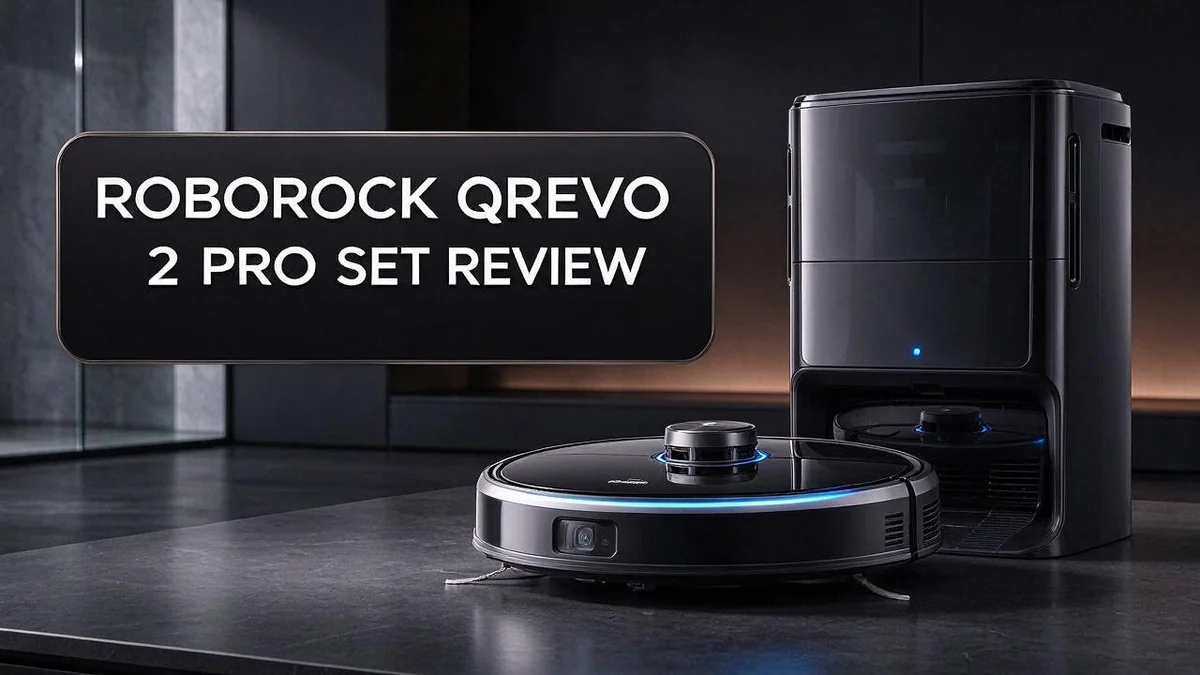
Roborock Qrevo 2 Pro Set Review: Is This Robot Vacuum and Mop Worth It?
Tired of vacuuming every single day? The Roborock Qrevo 2 Pro Set may be the helper you need. It combines strong suction with a mop that does the hard work for you.
This robot vacuum and mop packs 20,000 Pa of HyperForce suction. It picks up dust, pet hair, and crumbs from your floors with ease.
Its structured light sensors spot obstacles in cluttered rooms. It also climbs thresholds up to 4 cm, so it moves smoothly from room to room.
Many owners say the mapping works fast. They also like the app, where you can set schedules and adjust water flow from your phone.
Keep reading to see how this model performs in daily use and how it compares with other top picks.
In a Nutshell
-
Climbs thresholds up to 4 cm (1.57 in). This feature helps the robot move from room to room without getting stuck on door ledges. Many homes have these raised edges, so this matters.
-
Runs scheduled routines. You can set cleaning times for weekdays or weekends. Your floors stay fresh while you work, travel, or sleep.
-
Offers adjustable water flow. You can control how damp the mop pad gets. Hard floors often need more water, while lighter cleaning needs less.
-
Washes its own mop. The base station cleans the mop pad during the job. This keeps the pad fresher, so dirty water does not spread across the floor.
-
Works with app control. Owners can start, pause, or check progress from their phone. Many users say this simple setup makes daily use easy.
-
Faces strong rivals. Roborock Qrevo Pro adds hot water mopping and 7000 Pa suction. Roborock Qrevo Curv 2 Flow matches the 20,000 Pa suction with a dual brush design. MOVA P10 Pro Ultra earns a top pick spot from RTINGS.
Suction and Cleaning Power

Last update on 2026-10-28 / Affiliate links / Images from Amazon Product Advertising API
Suction power is often the first thing shoppers check. Strong suction helps a robot lift grit from the floor. Here is how this model holds up across different surfaces.
Suction matters most on rugs and carpets. Hard floors need less force than fibers do. A powerful motor reaches dirt that sits deeper in the pile.
Compared with the standard Roborock Qrevo, which sits at 5500 Pa, this model offers a clear step up. That extra force can help on rugs in busy rooms.
Hard floors gain from the mop setup too. The robot can switch between dry pickup and damp mopping in one job. Water flow control lets you match the pad to the mess. A lighter setting suits floors that do not like much moisture.
Keep the suction strong with simple upkeep. Empty the dustbin often so airflow stays clear. Clean the brushes and filter every few weeks. A clogged path makes even a high rating feel weaker.
Busy homes gain the most from this strength. Families with kids, pets, and daily foot traffic create more dirt. A machine with this strength can keep up with that load.
Test the robot in one room first. Run a single room on a normal day and note the results. Look for missed crumbs along walls and under furniture edges. Those spots show how the suction handles tight areas.
Suction alone does not solve every problem. Long haired pets can leave hair that wraps around brushes and slows the robot. Sources do not describe how well this model resists tangles. Shoppers with long haired pets should check that point first.
If tangles worry you, consider the Roborock Qrevo Curv 2 Flow. It shares the same 20,000 Pa rating. It also adds a dual brush built to resist tangles. That makes it a sharp option for homes with lots of hair.
Overall, this model delivers strong power for daily cleaning. Its suction works well on mixed floors. Pair it with regular brush checks and it keeps dust under control.
Navigation and Obstacle Detection
Good navigation decides how smoothly a robot cleans your home. A robot that bumps into chair legs wastes time. This model uses its map to plan clean, direct paths.
Think about the rooms in your house. Open spaces are simple to clean. Crowded rooms with shoes, bags, and toys need more care, and this robot steers around them instead of pushing them across the floor.
Fast mapping saves time during the first week. A quick first map means you can start cleaning sooner. Later runs reuse that map, so the robot covers each room in a steady order.
Before each run, pick up cords, socks, and small toys. Lift loose rug edges so they lie flat. Wipe the sensors with a soft cloth so they read the room clearly.
Open doors help the robot reach every room. Closed doors can leave whole areas out of the map. Low furniture can also block paths, so check the map after the first run and move items that cause trouble.
Obstacle detection works best with a little help. Shoes and bags near walls create tight spots. Pull them away from the wall and the robot can move with less stopping and starting.
Pet owners often notice more clutter. Food bowls, water dishes, and pet beds sit in busy paths. Place them in corners or on a raised spot to keep the route clear for each cleaning run.
Families with kids see the most benefit from clear navigation. Toys shift from room to room every day. A quick sweep before starting keeps the robot focused on dirt instead of obstacles.
Sources list no explicit cons for navigation. That is encouraging, but every home has its own layout. Watch how the robot handles dark corners and glass table legs during your first week.
Open the app after each job and review the route. Look for missed spots or strange turns. Small changes to furniture often fix these issues quickly.
Mopping and Self-Cleaning
Mopping is where this robot earns its place in a busy home. Many shoppers focus on suction, but a good mop makes hard floors look cleaner.
Think about how often your floors get sticky. Kitchens, hallways, and entry areas collect grease and grit. A damp mop picks up these spots more easily than a dry sweep.
The mop pad does most of the work during a run. Keep it clean, and the robot will spread less dirt across the floor. Rinse or replace pads when they look gray.
Self cleaning keeps the routine simple. After each job, the base station handles much of the mess. You spend less time with a sponge and bucket.
Drying matters as much as washing. A pad that stays wet can smell sour. Let the pads air out between runs whenever you can.
Edges and corners need extra attention. Mops reach close to walls, but baseboards may still show marks. Wipe corners by hand once a week for a sharper finish.
Carpets need care too. Lift the mop before the robot drives onto rugs. On thick floors, keep the water setting low.
Water use also affects the result. Too much water can leave wet spots on wood floors. Too little water may leave dust behind. Find the middle setting for each floor type.
Maintenance keeps mopping strong. Rinse the mop pads after each use. Empty the dirty water tank before it sours. Clean the brushes weekly so hair does not wrap around them.
Look at the floor in bright light after a run. Streaks hide in shadows but show up in sunlight. Check each room from a low angle for the clearest view.
Plan mopping for after dinner or before guests arrive. Hard floors look best when they dry fully before foot traffic returns.
Good mopping saves time and effort for every family member. Clean floors also give kids and pets a safer place to play.
Top 3 Alternatives
Eufy X10 Pro Omni

Last update on 2026-10-27 / Affiliate links / Images from Amazon Product Advertising API
This robot vacuums and mops in one pass. It saves time on busy days.
It also empties its own dustbin into the base. You can skip daily chores. Its obstacle avoidance helps it steer around cables, socks, and pet bowls.
Roborock Q7 Max

Last update on 2026-10-26 / Affiliate links / Images from Amazon Product Advertising API
This model packs strong suction for carpets and hard floors alike.
Its LiDAR sensor maps your home quickly, so cleaning runs feel organized. You can set no-go zones in the app to keep the robot away from delicate areas. It suits people who want reliable results with a simple setup.
Shark AI Ultra


Last update on 2026-10-27 / Affiliate links / Images from Amazon Product Advertising API
This option focuses on effortless cleaning from start to finish.
The base collects debris, so the bin stays empty for weeks at a time. Its AI camera spots clutter and avoids common obstacles like shoes and chair legs. It handles thick rugs and pet hair with ease. Families with busy schedules often find it a great fit for everyday upkeep.
App Control and Scheduling
Phone control makes daily cleaning simple. The app lets you start, pause, or stop a clean from almost anywhere. You never need to stand beside the robot to give a command.
Users often praise how easy the app feels to use. Most people learn the main buttons within a few minutes. The layout keeps common tasks close at hand.
Scheduling runs the robot when you are away. Scheduled routines let the robot clean without a button press. You choose the days and start times that match your week. A midday run can suit a home where people work or study during the day.
Try building a simple calendar first. Choose two or three set times each week. Then watch how the floors look after each run. This gives you a clear starting point before you add more routines.
The app also controls the water setting for each job. You can change how much water the mop uses during a scheduled run. Lighter settings suit quick touch ups. Stronger settings can help during a deeper weekly clean. Changing the setting takes only a few taps.
Plan runs around your home routine. Schedule cleaning for times when nobody walks through the rooms. Most households find that quiet hours work best. The robot can focus on the floor without interruptions.
Keep the schedule flexible. Life changes, so edit routines when plans shift. Pause a run when guests arrive. Restart it later with one tap.
Check the app history after each run. Look at the cleaning summary to see how long the job took. Notice which areas need extra time. Small adjustments often bring big gains over several weeks.
Scheduling and app control save time. They turn the robot into a helper that works on your timetable. Start with simple routines and build from there. Your floors will stay cleaner with less effort from you.
Pros and Cons
Pros
- Frees up your weekends from manual vacuuming and mopping.
- Handles dust and sticky spots in one single run.
- Suits people who want a hands-off cleaning routine.
- Shares the same top suction rating as the Qrevo Curv 2 Flow.
- Gives busy households more time for everything else.
Cons
- Hot-water mopping is not listed for this model.
- The base station needs open floor space near a wall.
- Mop pads and filters need regular replacement over time.
Who Should Buy It
Homes with lots of floor clutter gain the most. Shoes, bags, and toys often scatter across the floor. This robot’s obstacle detection helps it move around those items with fewer stops.
Households with raised doorways will appreciate the climbing ability. The robot can climb thresholds up to 4 cm. That height helps it roll between rooms without getting stuck at the door.
Shoppers who want quick setup will like the mapping speed. The robot maps a home fast. You can start cleaning soon after the first scan finishes.
Larger floor plans can benefit from the quick mapping. The robot learns the layout early. Later runs then cover each room with less guesswork.
Homes with long hair or many cords should compare models first. The Qrevo Curv 2 Flow adds a dual brush that resists tangles. That brush may suit busy households with lots of hair.
Apartment dwellers with bare floors may not need this much power. Small spaces with few obstacles can work with simpler machines. Matching the robot to the room size saves effort.
Owners who rearrange furniture often will see the benefit. Obstacle detection helps the robot avoid new chair legs and table edges. A fresh run lets it learn the updated layout.
Renters who move often may like the setup speed. The robot can join a new home quickly. Fewer steps mean less time spent on each move.
Every buyer should measure doorways and floor types first. Check door heights, rug edges, and furniture gaps before ordering. A quick measure helps you avoid surprises after delivery.
Shoppers in older homes may face uneven floors. Older homes often have raised door lips and worn wood transitions. The climbing height gives extra room for those lips.
Those with mixed floors should plan for transitions. Tile, wood, and rugs meet at many doorways. The robot handles those changes well when thresholds stay under 4 cm.
This model fits people who want strong obstacle handling and fast mapping. Most shoppers with clutter, raised thresholds, or big layouts will find it a good match. Compare your home against this list, then decide with confidence.
Final Verdict
The Roborock Qrevo 2 Pro Set earns a strong place on our shortlist. It suits busy households that want a clean home with less effort.
Think of it as a helper that works while you live your day. It vacuums and mops in one visit, so you skip two separate chores.
Shoppers should still compare a few rivals before they buy. Every model brings different strengths.
The Roborock Qrevo Pro is worth a look for one clear reason. It adds hot water mopping and intelligent spot detection, which many people value for sticky kitchen tiles.
Our research did not list clear cons for this model, but that does not make it perfect. Read owner reviews after a few months to see how the robot holds up over time.
Reviewers at RTINGS name the Qrevo Curv as the replacement for this line. They also highlight the MOVA P10 Pro Ultra as a top pick, so compare options side by side.
Who gains the most? Families with pets, open plan homes, and people with little free time often see the biggest difference.
Very small homes with few obstacles may not need this level of power. A simpler robot can still do the job well there.
Consider your floor types before you commit. Hard floors and thick rugs can change how well any robot performs, so check those areas in your plan first.
Good results depend on your habits too. Sweep up large items before each run, then let the robot handle the fine dust and crumbs.
Our verdict is simple. If you want a capable, app controlled helper for mixed floors, this set deserves a place on your list.
Final thoughts: the Roborock Qrevo 2 Pro Set combines strong suction, dependable obstacle handling, and handy app control in one package. It rewards owners who want a steady clean without constant attention.
That means less time on chores and more time for the things you enjoy.
Frequently Asked Questions
Can I start a cleaning from outside my home?
Yes. The app lets you start, pause, or check a cleaning from work or while you travel. You can see the progress on your phone without standing next to the robot. This makes it easy to fit cleaning into a busy day.
How does it avoid objects in cluttered rooms?
The structured-light sensors scan the path ahead. They spot chairs, cables, and shoe piles before the robot reaches them. This helps it move through busy rooms with fewer stops. Rooms with many small items still need a quick check, but the robot handles most obstacles on its own.
Can I change how much water it uses?
Yes. You can adjust the water flow in the app. Use less water for wood floors and more for tile or vinyl. Too much moisture can harm some floors, so start with a low setting and increase it only when needed. Adjusting the setting for each floor type keeps your floors looking their best.
Should I clear the floor before the first run?
A quick tidy helps. Pick up loose cords, socks, and small toys before you start. The sensors do a good job, but clear paths let the robot finish each room faster. A clean start gives you the best first result. After the first few runs, you can see which areas need extra attention and adjust your routine from there.

Hi, I’m Grace Bell, the founder of CleanFloorVault.com, where I personally test and review vacuum cleaners to help you find the perfect tool for a spotless home.